• Link to Facebook
  • Link to Youtube
  • Link to Instagram
  • Link to Mail
Our Tour Motorhome Blog
  • HOME
  • BLOG
    • Map of All Our Motorhome Stopovers
  • OUR BOOKS
    • The Motorhome Touring Handbook
    • Motorhome Europe
    • The 200
      • Gallery of Photos from Our Book: The 200
    • Motorhome France
    • Motorhome Morocco
    • A monkey ate my breakfast
    • OurTour Downloaded
    • The Non-Trepreneurs
    • Funding Freedom
  • HOW TO…
    • Fund Long-Term Travel
    • Prepare for a Tour
      • Choose Your Motorhome
      • Escape in a Motorhome
      • Prepare For A Trip
        • Travel during COVID-19
      • Install and Fix Stuff
      • Budget for a Motorhome Trip
      • Personalise Your Motorhome
      • Get Connected To The Internet
      • Stay Legal
    • Live in a Motorhome
      • Blog About Your Travels
      • Cook In A Camper
      • Handle Hot & Cold Weather
      • Find Places To Sleep
      • Use Your Motorhome’s Facilities
      • Install and Fix Stuff
      • Stay Safe
      • Thrive In A Small Space
      • Travel With A Dog
      • Keep Fit On The Road
      • Make Money on The Road
        • Book Publishing
        • Amazon Associates
        • Blogging
    • Tour Europe by Motorhome
      • France by Motorhome
      • Germany by Motorhome
      • Italy by Motorhome
      • Morocco by Motorhome
      • Norway by Motorhome
      • Spain by Motorhome
  • INSPIRATION
    • Maps & Blogs
      • Our Motorhome Tours
        • 2019 France & Spain
        • 2018 France
        • 2017 Winter in Morocco
        • 2016 Summer in Scandinavia
        • 2015 Spanish Pyrenees
        • 2012 Tunisia and Eastern Europe
        • 2011 Europe and Morocco
        • Our Overnight Locations Map
        • Maps of All European Motorhome Aires
      • More Blogs & Maps
        • Other Blogger’s Touring Maps
        • More Motorhome and Campervan Blogs
    • Financial Independence / Early Retirement
      • Our Financial Life Experiment
      • The Money Muppet
        • Map of Overnight Stops
      • The Non-Trepreneurs Book
      • Funding Freedom (Free Download)
  • MOTORHOMES & KIT
    • Our Motorhomes
      • Zagan – 2001 Hymer B544
      • Dave – 1993 Hymer B544
      • Harvey – AutoSleeper Harmony
    • Internet SIM Cards
    • Budget Truck Satnavs
    • Off-Grid Motorhome Kit
    • Core Motorhome Kit
    • Full Motorhome Packing List
  • ABOUT
    • Ten Years of OurTour
    • OurTour on YouTube
    • About Us
      • Press Coverage
      • Contact Us
    • Legal Stuff
      • Privacy Policy
      • Disclaimer
  • SEARCH
  • Menu Menu
You are here: Home1 / Blog Posts2 / How To...3 / Blog About Your Travels4 / Creating Your Own Blog, For Free in 30 Minutes

Creating Your Own Blog, For Free in 30 Minutes

May 11, 2017/6 Comments/in Blog About Your Travels

This blog post describes how anyone can create their own travel blog, in less than 30 minutes, and for free.
In 30 mins you'll have a blog like this one

In 30 mins you’ll have a blog like this one

As you can see on our Fellow Traveller’s page, there are stacks of folks out wandering in motorhomes and campervans, and sharing their experiences by blogging about it. If you fancy doing the same thing, but aren’t sure how, here’s a three step guide. It’ll take you about 25 minutes, less if you click quickly! Get a brew, and let’s go.

With this method you’ll get:

  • A WordPress-based site, one of the world’s pre-eminent blogging platforms
  • The site for free – that’s right, no cost to you
  • A simple-to-edit site, no need to learn any nasty code, although you will need to learn how to use the editing interface, but it’s not hard
  • Some restrictions, like the fact you can only upload 3GB in total of photos, and your blog name has to end in .wordpress.com

Note: ourtour.co.uk is a WordPress site, but it’s self-hosted, so it runs a bit differently to the way described here. Being self-hosted gives us more flexibility but needs some IT nerd skills and money to power it. If you’re into that stuff, check out how to start a self-hosted WordPress site here.

OK, let’s go. Just follow the instructions in the three steps below. Note that this post was written in May 2017, and some of the steps might change a bit over time as WordPress update their platform.

Step 1: Setting up a Free WordPress.com Blog

In this step we’ll create the bare bones of your blog, and set up an account on WordPress.com so you can later come back and add more blog posts.

Time taken: 10 minutes

  1. Browse to https://wordpress.com/
  2. Click on Get Started
  3. Click on Travel >
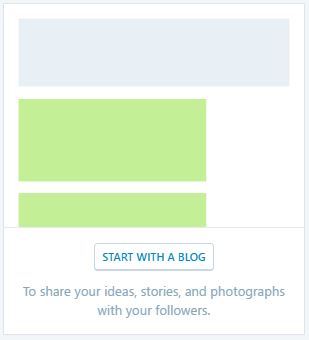
  4. Click on Start With a Blog
  5. Click on any of the themes, you can change this later on so don’t worry too much at this point
  6. Enter the name of your site (ours is ourtour – just type in yours – like enoughwithwork.wordpress.com). WordPress will automatically add ‘.wordpress.com’ to the end unless you pay for the premium version, which we’re not doing here!
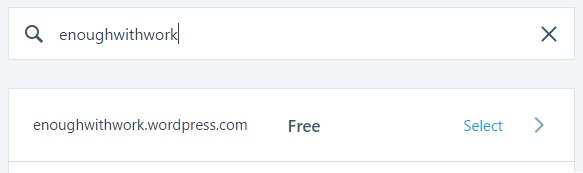
  7. Click on Select against the Free domain name
  8. Click on Start with Free
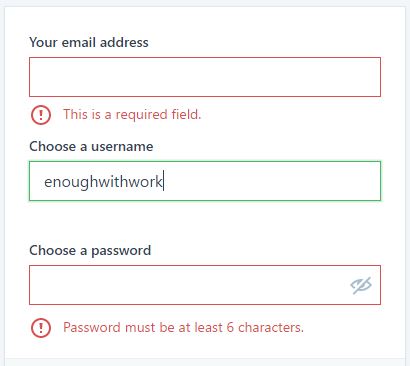
  9. Enter your email address, and a username and password which you’ll use to later log into your blog when creating new content.
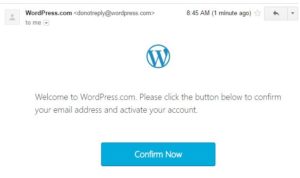
  10. Have a look in your email and find the one just sent to you by WordPress. In it, click on Confirm Now.
  11. That’s it, you now have the bare bones of your blog created. The blog is shown back to you ready to start adding content:
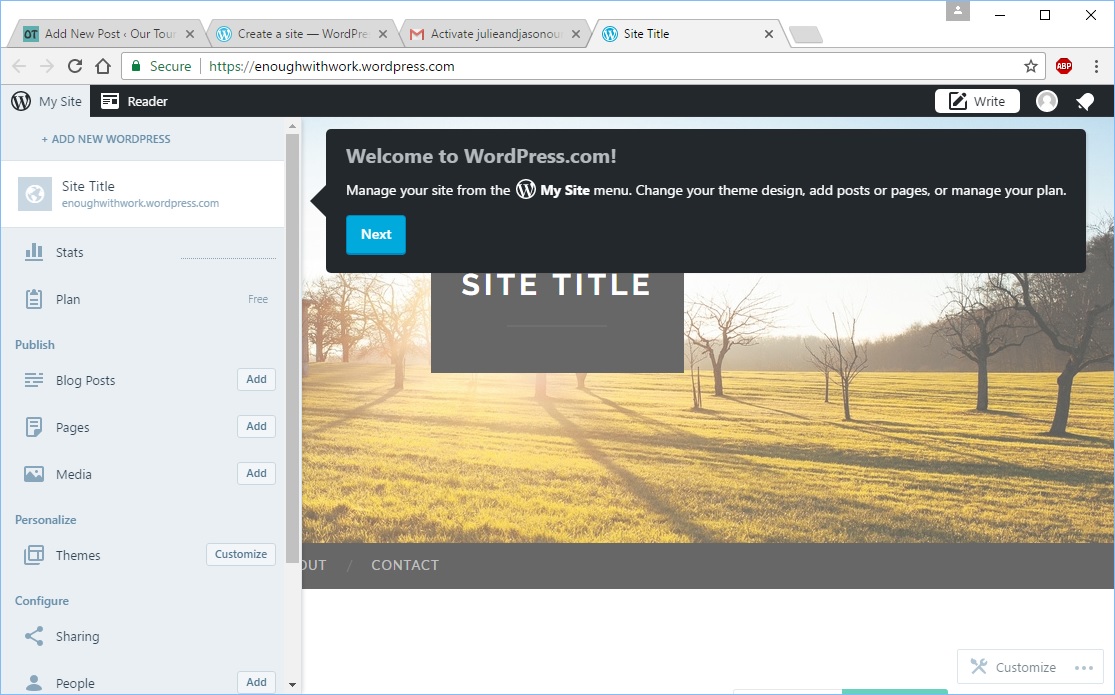
Step 2: Configuring Your Site

In this step we’ll add a title and tagline (sub-title) to your site, getting you used to configuring the site itself.

Time taken: 5 minutes

  1. On the bottom left of the page, click on Settings

  2. Just enter a Site Title and Site Tagline for now, like this:
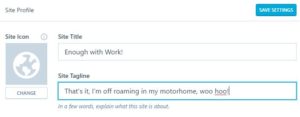
  3. Click on Save Settings
  4. Scroll up to the left and click on Site Preview. You can see that your site’s been updated with the new title and tagline.
  5. Click on the X button to close the preview screen and go back to the editor.

Step 3: Adding Your First Blog Post

In this step we’ll add some actual content – your first blog post, ready for all the world to see, complete with a shiny photo.

Time taken: 10 minutes

  1. Click on the Add button next to Blog Posts on the left.

  2. Type in a title for the post, and underneath that write your content.
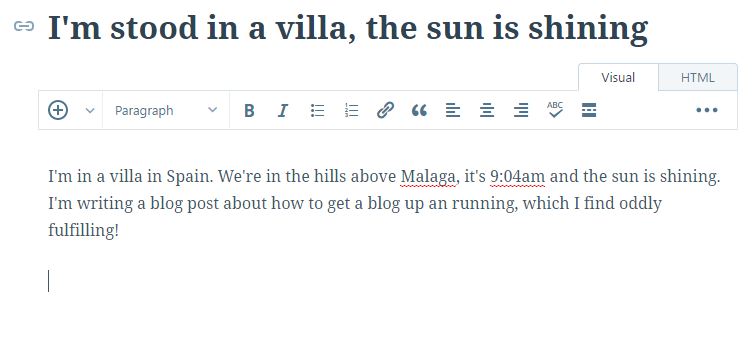
  3. Let’s add a photo too. To do this, click on the  button
  4. Click on the Upload Media button.
  5. Find the photo, click on it, then Upload.
  6. When it’s finished uploading, click on Insert.

  7. Now click on Publish to the top right and BOOM. Your first blog post is up there, LIVE, on the internet for several billion people to see!

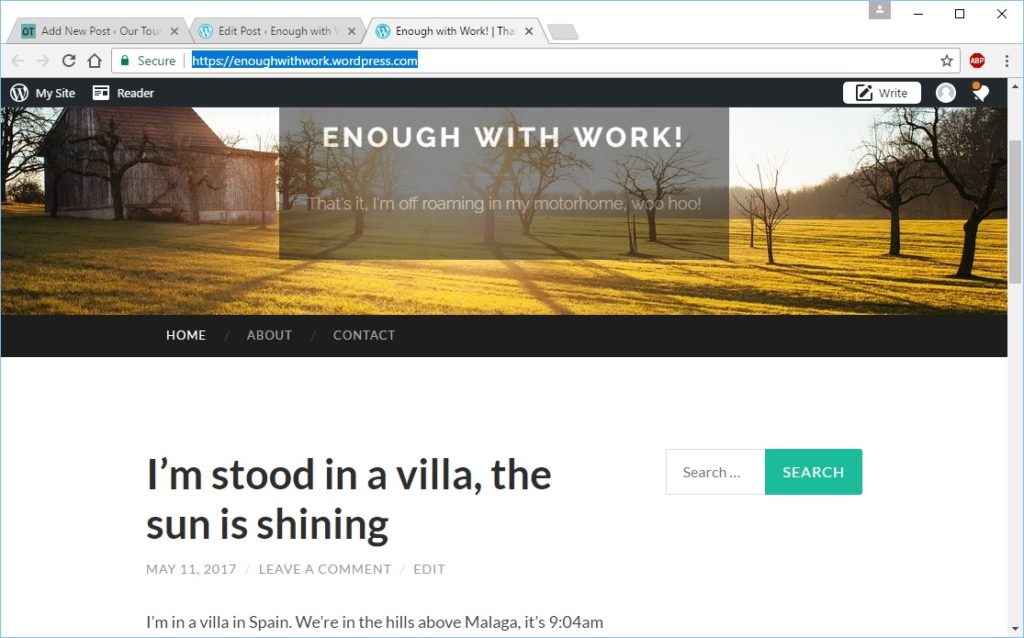
  8. Browse to your site’s URL (https://enoughwithwork.wordpress.com/ in this example) and you’ll see what the world can see!
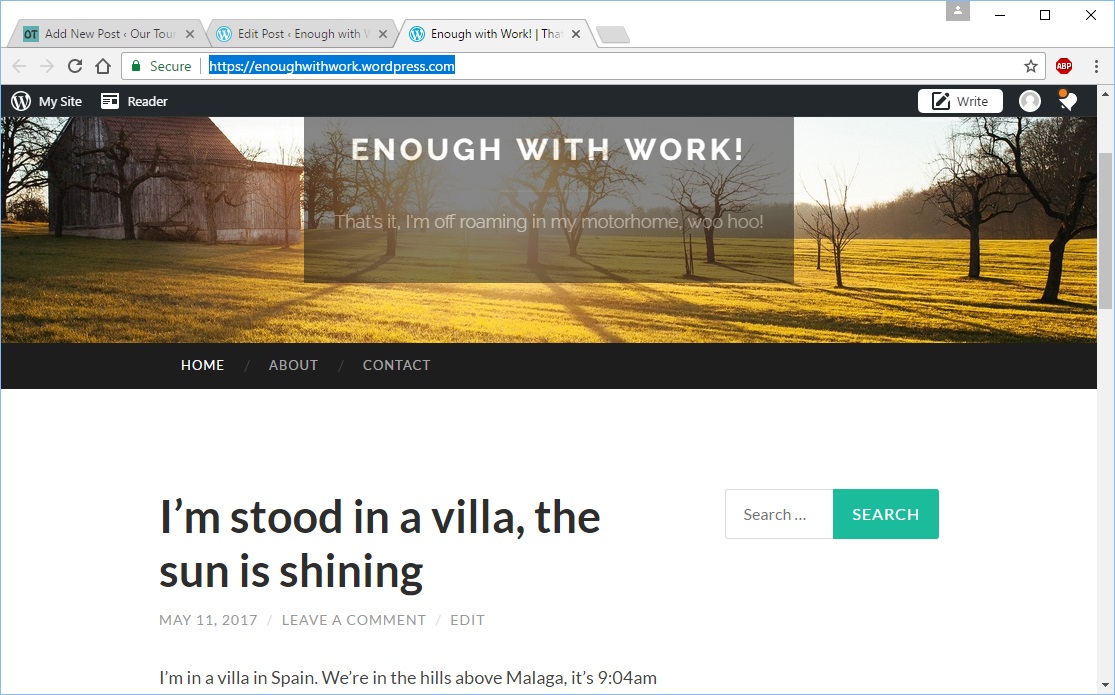
That’s it.

You will most likely want to tweak your site, changing background images, categorising your posts, adding maps or other plug-ins, you name it (click help on doing this). But the basic blog is there, and ready for your content to go up.

  • When you want to share it out with people, just send them the link, in this case: enoughwithwork.wordpress.com.
  • If you’re blogging about motorhome touring, then once you’ve added a few posts, be sure to send us the link (to julieandjason@ourtour.co.uk) and we’ll add it to our Fellow Traveller’s page.
  • When you want to add more content, just go back to WordPress.com, log in if you need to using the username and password you created above, otherwise just carry on adding blog posts or otherwise tweaking away!

Cheers! Jay
Share this entry
  • Share on Facebook
  • Share on X
  • Share on WhatsApp
  • Share on Pinterest
  • Share by Mail
https://ourtourmedia.s3.eu-central-003.backblazeb2.com/wp-content/uploads/2017/05/First-post-live-on-site-1.jpg 695 1115 Jason https://ourtour.co.uk/home/wp-content/uploads/2018/11/Header-Teal-NB-300x57.png Jason2017-05-11 09:38:382018-12-05 13:25:13Creating Your Own Blog, For Free in 30 Minutes
6 replies
  1. Mike and Mandy Motley says:
    May 11, 2017 at 11:44 am

    Looks straightforward Jay. Can we upgrade to Premium at a later date if we wish? Cheers Mike

    Reply
    • Jason says:
      May 11, 2017 at 4:10 pm

      Oh yes, they’ll happily allow you to shift to paid plans – have a look for the ‘Plan’ menu option, just above the button you use to add a new Post. Cheers, have fun, Jay

      Reply
  2. Vesna says:
    May 12, 2017 at 9:35 pm

    Hello! We are now for a good month traveling through Morocco. Your previous informations were very useful and as you have said, country is beautifull and people are very nice. We, too, are writing the blog, but using another platform Travelpod. I find it more easy to use. You can find our blog at http://www.travelpod.com/travel-blog/bibka/23/tpod.html. Well, it’s written in Slovene but you can translate it by using Google translate gadget on top. Only don’t blame me for quality of translation and rather laugh instead. Cheers and have fun, Vesna

    Reply
  3. Paul says:
    May 14, 2017 at 5:38 pm

    Thanks for the blog tutorial Jay, we just need to get in our motorhome and go now!

    Reply
  4. Ann Schmidt says:
    May 14, 2017 at 9:27 pm

    Hi Guys
    Thanks for this – but one question – I seem to have found two versions of WordPress – both .com and .org – do you know what the difference is please?
    I am confused as the page that opens from your link doesn’t appear to have a GET STARTED button?? Also when I tried to start a Blog it added web.wordpres…etc. not just .wordpress….etc.
    Or may be I am being dense?

    Reply
    • Jason says:
      May 15, 2017 at 8:59 am

      Hi Ann

      You are, of course, not being dense! There are two versions of the wordpress software:

      1. WordPress.com is the simple one, where they do all the work of installing the software, running the server and keeping it up to date
      2. WordPress.org is the complex one, where they give you the software for free, but you have to install it, find and pay for a server to run it on, and keep it up to date

      You want WordPress.com, and the first screen you see should look like this, which has a Get Started button:

      Wordpress.com Getting Started Page

      I’m not sure why it’s adding the additional sub-domain (.web.wordpress.com), I can’t find any reference to this in a quick search.

      Cheers! Jay

      Reply

Leave a Reply

Want to join the discussion?
Feel free to contribute!

Leave a Reply Cancel reply

Your email address will not be published. Required fields are marked *

This site uses Akismet to reduce spam. Learn how your comment data is processed.

Subscribe by Email

Search OurTour

Search Search

OurTour Motorhome Books

OurTour Motorhome Books on Amazon
Recent
  • Judith Smith sitting in a chair
    The Toughest Few MonthsMay 22, 2026 - 7:49 am
  • Backblaze Cloud Storage
    Reducing the Size of a Large (50GB) WordPress BlogApril 10, 2026 - 3:04 pm
  • Two people eating ice creams
    Escaping the British Winter – without our Motorho...February 26, 2026 - 5:36 pm
  • 2025 Round Up, and 2026 PlansDecember 31, 2025 - 5:22 pm
  • Julie and Jason of OurTour Motorhome Blog
    Embrace the Boredom Folks!November 24, 2025 - 1:41 pm
  • Yes, a Stock Market Crash is Coming!September 10, 2025 - 1:04 pm
Comments
  • Hello, Sharing this could also help. I lost my mum...May 25, 2026 - 9:48 pm by Fiona Potts
  • Thank you for sharing this really hard situation in such...May 25, 2026 - 1:03 pm by Steve + Kiri
  • Cheers guys, can we offer our condolences. Sadly it's very...May 23, 2026 - 10:44 am by Jason
  • Hi Ju. 'The darkest hour is always just before dawn' so...May 22, 2026 - 11:13 pm by Ken Octon
  • Hi Ju and Jay So sorry to hear about the loss of your dear...May 22, 2026 - 7:55 pm by Gav and Trudi
  • Dear Ju, Beautifully written and all so true. We/ I recognise...May 22, 2026 - 6:28 pm by Chris and Peter
Popular
  • Ask Us Anything. Within reason…May 6, 2017 - 11:04 pm
  • Rest in Peace Charlie – You Were The Best.June 28, 2018 - 2:52 pm
  • OurTour Motorhome Packing ListApril 9, 2018 - 6:00 pm
  • Melkevoll Bretun Camping Norway
    The Death of the Year Long Motorhome Tour of Europe?January 4, 2019 - 3:49 pm
  • Superdrug Mobile UK Website
    The Best UK Internet Data SIMs For Roaming in Europe 20...August 8, 2021 - 12:02 pm
  • Touring Norway in a MotorhomeSeptember 29, 2016 - 6:56 pm
Tags
Aire Camper Campervan campsite cost costs Early Retirement Europe financial education Financial Freedom financial freedom blog Financial Independence Financially Free France Morocco motorhome motorhome costs motorhome europe motorhome france motorhome spain motorhome tour motorhome touring Motorhome tour of Norway Norway by motorhome Portugal preparation RV Spain spending touring

We’re an Amazon Associate

Ourtour.co.uk is a participant in the Amazon Associate scheme. This means we include links to Amazon.co.uk for products we can recommend. If you use these links to buy from Amazon they'll pay us a percentage of their profit in return. The price you pay is the same as if you'd shopped direct on the Amazon website.
© Copyright - The Our Tour Travel Blog - Enfold Theme by Kriesi
  • Link to Facebook
  • Link to Youtube
  • Link to Instagram
  • Link to Mail
  • HOME
  • BLOG
  • OUR BOOKS
  • HOW TO…
  • INSPIRATION
  • MOTORHOMES & KIT
  • ABOUT
  • SEARCH
Link to: The Simple Secret to Financial Freedom Link to: The Simple Secret to Financial Freedom The Simple Secret to Financial Freedom Link to: Our Final Week in The Villa House Sit, Valle de Abdalajís Link to: Our Final Week in The Villa House Sit, Valle de Abdalajís Our Final Week in The Villa House Sit, Valle de Abdalajís
Scroll to top Scroll to top Scroll to top